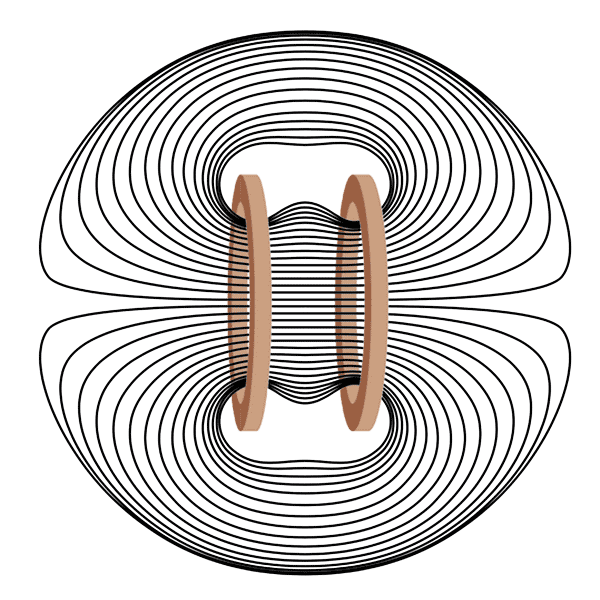
The CELLER8 Max comes with our Dual Small Loop applicator, also known in the PEMF industry as a Helmholtz coil or butterfly coil. This design places two coils in parallel, facing the same direction, so the magnetic field penetrates evenly all the way through the targeted area without losing strength in the middle. That means you get consistent, PEMF from one side to the other, making it ideal for “sandwiching” smaller joints and areas such as the ankles, knees, wrists, hands, elbows, and shoulders. By delivering uniform energy throughout, the Dual Small Loop helps ensure the full therapeutic effect reaches deep into the tissue, making it one of the most effective applicators for localised high-intensity PEMF support.
Frequently Asked Questions
What is the Dual Small Loop best for?
The Dual Small Loop is designed for precise, high-intensity PEMF application. Its dual-coil layout makes it ideal for targeting smaller, specific areas like joints, muscles, or the lower back.
How do I position the Dual Small Loop?
You can place the two loops on either side of the target area. For example, on the front and back of a knee or shoulder. This creates a strong, focused field across the tissue in between.
Have a question that wasn't covered in our FAQ section? Reach out to us using the contact form below. Our team will be happy to assist you with any inquiries you may have!
Email: *
Frequently Asked Questions
Have a question that wasn't covered in our FAQ section? Reach out to us using the contact form below. Our team will be happy to assist you with any inquiries you may have!
Email: *
What is the Dual Small Loop best for?
The Dual Small Loop is designed for precise, high-intensity PEMF application. Its dual-coil layout makes it ideal for targeting smaller, specific areas like joints, muscles, or the lower back.
How do I position the Dual Small Loop?
You can place the two loops on either side of the target area. For example, on the front and back of a knee or shoulder. This creates a strong, focused field across the tissue in between.
You May Also Like
Al seleccionar una opción, se actualiza toda la página.
Se abre en una nueva ventana.
PayPal Pay Later Messaging
Step 1: Choose message placement
Click the button below and then hover over your page to select a placement.
Step 2: Paste and save
You have copied the placement for the Product Page.
Go back to the App Embeds section, and in the Paypal Advanced Settings, paste the copied value into the
Product Page field and click the 'Save' button in the top right corner.